Weekly Tutorials Chad Troftgruben Weekly Tutorials Chad Troftgruben

Learn How to Animate a Space Ship with this Week's Free Tutorial!

That’s right, it’s time for more free tutorials! This week we look at how to animate a simple establishing shot in Moho Pro.

Interested in viewing the course? It contains close to 11 hours of content with numerous exercise files breaking down how to create this sequence:

Read More
Weekly Tutorials Chad Troftgruben Weekly Tutorials Chad Troftgruben

New Free Tutorial! Different Action Types in Moho Pro

Are you a Moho user who is curious about the Actions panel? Well, I have a full course now available on this subject. But if you’re looking for a quick explanation of the different action types, you will want to check out this free tutorial. I go over the three main action types using version 13’s new enhanced Actions panel.

I also have a new Newcomer membership perk coming next week. Stay tuned for more info on that!

Read More
Mr. Benik's Class, Weekly Tutorials, Weekly Updates Chad Troftgruben Mr. Benik's Class, Weekly Tutorials, Weekly Updates Chad Troftgruben

Weekly Update: New Backgrounds, Props and Benik Animations

Hi there!

This week was a little less busy for tutorial work. But that doesn’t mean nothing has been going on. Here is a recap for your reading pleasure.

First, I released a new preview for my latest course. This one covers how to fill in objects after throwing down line work. You can check out the video below! And if you’re interested in purchasing the course, use this link to receive 20% off!

Next, I managed to squeeze out seven new downloadable files this week. The bulk of them are abstract backgrounds, but I also threw in a new cave scene and two new alien guns for props. You can purchase these packs individually. If you’re a Studio member, you already have access to these files. View the images below to see what as added.

I’ve been spending the past week working on my new personal project: Mr. Binek’s Class: The Great Asscape. It’s been nice to take a little break from tutorial making. However, I do have to question my sanity on this one. Sure, it’s a throwback to an old idea I did in high school 18 years ago. But, as I keep going, I am wondering some things about myself. With that said, I posted a stationary Benik animation followed by the first 40 seconds of what I did so far. It’s still a bit rough, but should give a good idea of where I’m going with this.

And that’s it for this week! Thanks for reading and good luck with your projects!


Read More
Weekly Updates, Weekly Tutorials Chad Troftgruben Weekly Updates, Weekly Tutorials Chad Troftgruben

Weekly Update: New Animate Course Released, Plus Demo Videos

Hello!

Time for another weekly update! This one is a bit light on content but that’s mostly due to wrapping this new course. The end process always takes up a good chunk of my time. So unfortunately, there will be no asset releases this week. Look forward to that next week, though!

As stated in a previous post, Designing Cartoon Characters in Adobe Animate is now available! This course acts as a prequel to Rigging and Animating in Adobe Animate. If you’re looking to understand the design tools in this software, then this course is for you!

I also released another sample from the course. I will embed it below for your viewing pleasure.

That’s it from me! Short and sweet. Until next week…

Read More
Weekly Updates, Weekly Tutorials Chad Troftgruben Weekly Updates, Weekly Tutorials Chad Troftgruben

Weekly Update: New Props and Sky Textures

Hello!

I hope you’re having a great weekend. I am back for my weekly update on all things Chad. I am the most interesting subject I know most about, after all.

I still have my new Benik episode on hold as I work through more Toon Files content. Unfortunately, this is the reality of my workflow; it’s hard to focus on two full projects at once. But, the scenes are still built, voices are recorded and the process is ready for me to jump back to. I am hoping this will happen mid October, after I release Designing Vector Characters in Adobe Animate.

2019-08-24.jpg

Speaking of my new course, why not check out the new free lesson I released this week? This 16 minute video goes through the process of designing a character’s torso and should give a good idea of what the bulk of the course will aim to achieve.

Finally, I have released 12 new files this week: six props and six textures. The props are a bit of a mishmash while the textures are all skies. So if you’re looking to add a sky box or texture a vector in Moho, you may find these useful!

New Assets for Cartoon Props Pack:

New Sky Textures for Cartoon Textures Pack:

That’s it from me this week. Thanks for reading and happy animating!

Read More
Weekly Tutorials Chad Troftgruben Weekly Tutorials Chad Troftgruben

Free Lesson of the Week: Dragger Handles in Character Animator

This lesson is from a larger course which can be located at: https://www.toonfiles.com/rigging-and-recording-in-adobe-character-animator

Dragger handles, coupled with the Dragger behavior, allow us to drag and move any part of the rig we choose. But like pins, layer independence plays a big role in dragger functionality.

Read More
Weekly Tutorials Chad Troftgruben Weekly Tutorials Chad Troftgruben

Implementing Mouth Poses into a Photoshop Rig

This week we continue building a rig for lip syncing by grouping mouth poses together and properly shading inside of Photoshop.

Read More
Weekly Tutorials Chad Troftgruben Weekly Tutorials Chad Troftgruben

Updating PSD Rigs for Moho

This week we learn how to make additions and changes to a rig in Photoshop and have them apply to Moho.

Read More
Weekly Tutorials Chad Troftgruben Weekly Tutorials Chad Troftgruben

Cleaning Lines and Filling Shapes

This week we continue building a character by cleaning lines and filling in all the major areas. From here we can add more details and prepare the structure for animation.

Read More
Weekly Tutorials Chad Troftgruben Weekly Tutorials Chad Troftgruben

Outlining a Character in Adobe Draw

This week's tutorial is all about Adobe Draw. Check it out in the video below!

Read More
Weekly Tutorials Chad Troftgruben Weekly Tutorials Chad Troftgruben

Interpolating a Mouth and Jaw with Moho Actions

This week's tutorial focuses on Moho and the ability to use actions to lip sync. By doing this, you can interpolate between keys, creating a smooth moving mouth that can be used whenever you want.

Read More
Weekly Tutorials Chad Troftgruben Weekly Tutorials Chad Troftgruben

Lip Syncing with the Frame Picker in Animate CC

This week's tutorial showcases how the Frame Picker can be used for lip syncing and other frame by frame like motions in Animate CC. Check it out below!

Read More
Weekly Tutorials Chad Troftgruben Weekly Tutorials Chad Troftgruben

Anchoring Moho Rigs with Target Bones

This week's tutorial is back to Moho. Here I demonstrate the uses of Target Bones, from anchoring to squash and stretch. Target Bones can really help ground a rig into a scene and opens up the possibilities for new techniques. Check out the tutorial below!

Read More
Weekly Tutorials Chad Troftgruben Weekly Tutorials Chad Troftgruben

Learn How to Apply Quick Color Effects in Premiere!

I forgot to post this last Friday. My face is incredibly red. But so is my hair, so whatever. 

Last week's tutorial was all about Premiere. Here I show how to quickly alter a cartoon or film using the Color tab in Premiere. This can be useful for making color corrections or grading footage. View the embed below to check out the tutorial!

Read More
Weekly Tutorials Chad Troftgruben Weekly Tutorials Chad Troftgruben

Lip Syncing with the Switch Selection Panel in Moho

This week I have released a new tutorial on how to quickly lip sync a character in Moho using the Switch Selection panel. This panel can help create frame-by-frame like movements, with the added benefit of a visual interface.

You can check out the tutorial using the embed above! Be sure to come back next week for another tutorial!

Read More
Weekly Tutorials Chad Troftgruben Weekly Tutorials Chad Troftgruben

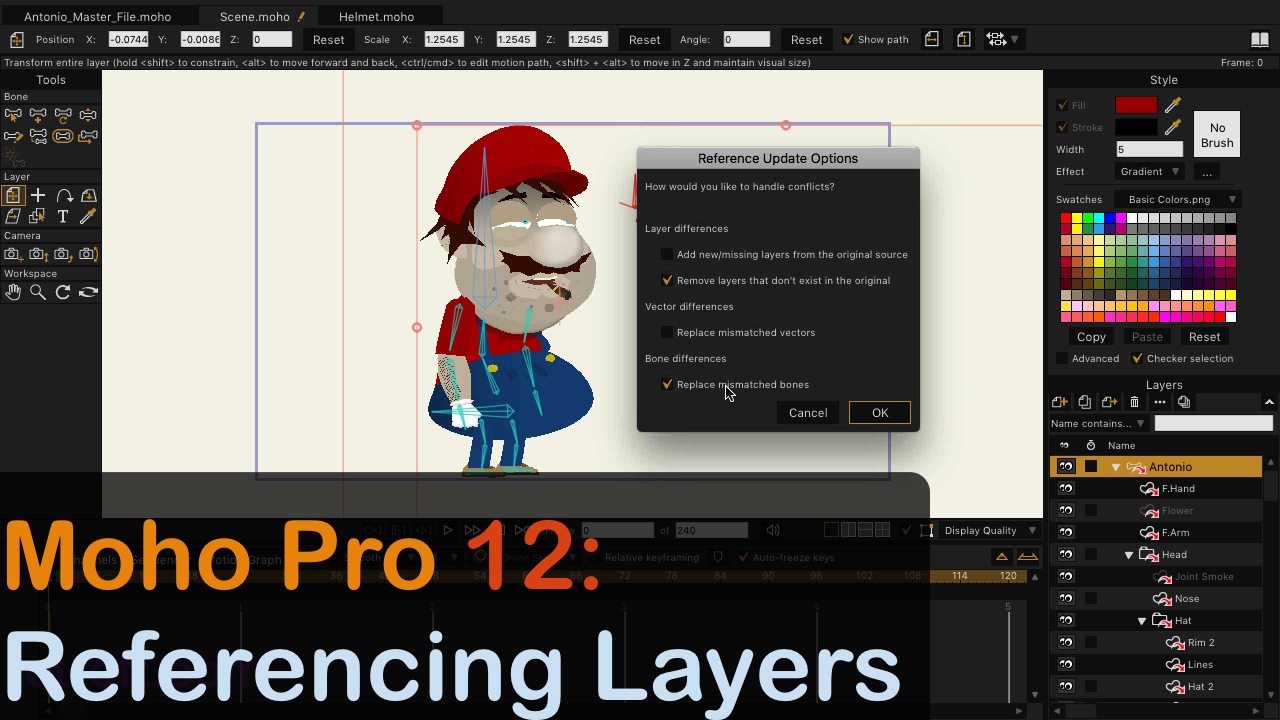
Referencing Layers with Moho Pro 12

Learn how to setup master files and reference them in Moho!

In this week's tutorial I jump back into Moho and show the process of using Layer References. This is a great practice if you want to create a master library for your rigs and props. Or it can be useful in team settings when changes are coming quick and different tasks are dispersed. 

Check out the tutorial right here:

Read More